Paul_D
October 10, 2017, 10:18am
1
Is it possible to pass parameters to a procedure in an open editor and execute from there instead of manually entering the parameters?
For example :
@IN_PARTY_ID , INTEGER , 99999
@IN_ACTIVITY_TYPE_ID , INTEGER , 5 ;
@IN_PARTY_ACTIVITY_NUMBER , INTEGER , 19313
@IN_SWITCH , CHARACTER , ‘NNNNYNNN’
@IN_TABLESPACE , VARCHAR , 'TS_SPACE_01
@OUT_RETURN_CODE , INTEGER 0
@OUT_RETURN_MESSAGE , VARCHAR ‘-’
CALL “PROC_99999”.“DM_MY_PROC”(@IN_PARTY_ID , @IN_ACTIVITY_TYPE_ID , @IN_PARTY_ACTIVITY_NUMBER , @IN_PROC_LEVEL , @IN_SWITCH , @IN_TABLESPACE , @OUT_RETURN_CODE , @OUT_RETURN_MESSAGE );
COMMIT;
Thanks,
Paul
Hello Paul,
I don’t work for Quest/TOAD, but I know of a solution that should work for you. It sucks you can’t declare variables for Db2 z/OS.
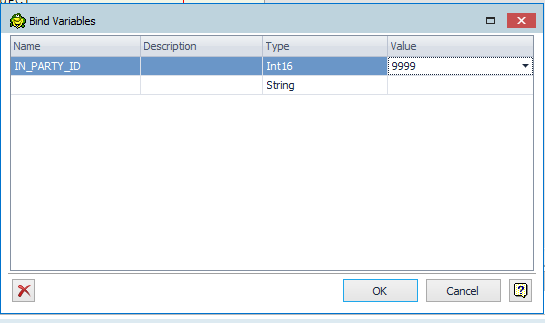
Toad will allow you to blind variables at run time.
To do this first view the Toad Views panel (View --> Toad Views). Then click on the (x)= link
Then enter then name and value of the parameter or variable you want.
I hope this helps you out!
some of our other providers have an execute proc action. Here it prompts you for param values and builds script to execute. Seems to me that could be easily added.
Thanks for the information.
I have created TDB-3491 to track this request.