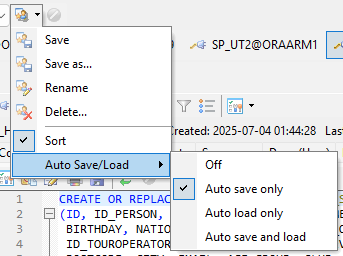
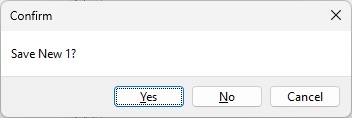
I change the workspace quite frequently and have activated the option (Auto save only).
Is there a way that I don't have to confirm that I want to change the workspace for every unsaved file?
So similar to “Fast Exit” a kind of “Fast Workspace switch”.
The Editor prompts to save modified tab contents when the Prompt to save on editor close option is checked. The option is located on the Editor | Open/Save page in Toad Options. Unchecking the options should ask you to confirm the workspace change without additional prompts to save files.
But doesn't that also mean that closing an unsaved editor tab is done without prompting?
I'm changing workspaces also quite often and when I have many files open I just click button Save current workspace. I also made a copy of this frequent used button outside of drop down menu (picture below). Then I switch to other workspace and when I'm asked to save files I select on 1st dialog (Close all windows and any connections...) Yes and then on the 2nd dialog No to All and all files are retained when I open this workspace again later without saving each file before.
I suggest you to make some sample workspaces with test files insides and try it. I hope this will help you.
I have activated automatic saving for my workspaces:
And No to all only applies to one specific connection.
I usually have more than one connection open and then have to click No or No to all (if there are multiple editor windows) for each of these connections.
I have Auto Save/Load set to Off and I save it when I make some important changes, in case something crash i don't got saved some temp stuff. I work quite a lot with nested cursors and on 1st run Toad usually crash so I save it before so I don't have to compose pieces from partial recovery files.
I usually use for each connection separate instance. So I save for one toolbar space vertically because I don't need to display Connection bar.
But I try if I simultanously use more then one connection my approach still work ok. You just select on 1st Yes and on the 2nd No or No to All.
I'm not quite sure what you mean, but in my case the following dialogs appear when I change the workspace:
First:
Second:
This is for the first connection. Since there's just one unsaved editor window, there's no "No to All" option.
Third:
This if for the second connection where's two unsaved editor windows.
This repeats until all connection has been closed.
The only option, which works so far is to disable the prompt to save on editor close, but this applies to any closing of an editor not just closing a saved workspace.
Hi,
Sorry for late reply, I was away from PC.
Like I said I have for each connection separate instance of Toad. So I see this dialogs for each active connection. Maybe I didn’t express clear enough in my last reply.
If you have open multiple connections then you would see this dialogs for each one as you mentioned as long are there any unsaved files. Maybe you could save all before using Save all button. That’s all I can help you here.
This is a good idea. I'll work on it for next beta.
I think you had already expressed that perfectly.
But I'm basically looking for a function like “Fast Exit”. I don't want to save anything when changing the workspace, as the workspace is saved automatically.
I would like to have some kind of “Fast Switch”. May be as on option in this dialog:
Ok, next beta, that prompt will now look like this:
A few points:
- The current prompt is shown every time you manually load a workspace, but the text is different. That will still be true. If no workspace is currently open, then the "save current workspace before closing" checkbox will be disabled. It will default to checked if the option to auto-save workspaces is also checked.
- The "Close Editor without prompts" checkbox will be enabled anytime an editor is open. It will be default to checked if the "save current workspace" box is checked, otherwise it will default to unchecked.
- The option is only to "Close Editor without prompts", not "Close all windows without prompts" because most windows do not have their contents written to the workspace (only the fact that they are opened). Let me know if you feel that something should change here.
This sounds and looks good. 
I made a few more changes to this for next beta.
Mainly -
- the options are now all grouped together in a dialog
- The "save workspace" option will now save when Toad closes, when you switch workspaces, and when you change from a workspace to "no workspace selected" (previously it only saved when you closed Toad)
- I added an option that allows you to not be prompted at all when you change workspaces
I changed the icons for "Save as" and "Rename", and added one for Options.
These are the default options
Here's the "change workspace" prompt
- The word "options" is there to help indicate that the checkboxes here reflect and will change the main workspace options.
- The "auto-save" option is disabled if you are switching from "no workspace selected". In that case there is nothing to save
- The "close editors" option is disabled if there are no open editors
I like that very much.  It's really helpful for my workflow.
I have one more question or suggestion:
Does it make sense to include the Workspace Options in the Toad Options?
Otherwise it could be confusing that there are options for the workspaces that cannot be configured via the Toad options.
Otherwise it could be confusing that there are options for the workspaces that cannot be configured via the Toad options.
Normally if it's a short list of options for some window or feature, I try to put them with that window or feature instead of in the main options window. I feel like users have a better chance of seeing the options that way.
That's ok with me  It was just a thought.